


• Title: Graphic Design for Beginners – Make Ideas Look Brilliant

    Graphic design isn’t just decoration – it’s communication. Whether you're designing a poster, logo, website banner or album cover, design helps ideas shine. Getting started is easier than you think – you just need an eye for clarity and a few basic principles.


    Here’s your first creative toolkit:

    1. Understand visual hierarchy.
    Design isn’t just what you show, but how. Use font size, color, spacing, and alignment to guide the viewer’s eye. Big title, medium subhead, small body text – that’s your foundation.


    2. Pick a simple color palette.
    Use no more than 2–3 main colors. Use contrast wisely: dark vs. light, warm vs. cool. Try palette generators like Coolors.co for inspiration.


    3. Fonts matter more than you think.
    Choose readable fonts that match your message. Pair a strong header font (like Bebas Neue or Playfair Display) with a simple body font (like Lato or Roboto). Avoid using more than two fonts per design.


    4. Use grids and alignment.
    Good layout = invisible structure. Align your elements, keep spacing even, and avoid clutter. White space is your friend – it gives your content room to breathe.


    5. Less is (almost) always more.
    Remove anything that doesn’t add value. Ask: Does this element serve a purpose? Clean, minimal designs are more effective than noisy, overloaded ones.


    6. Learn by copying (for now).
    Recreate posters or ads you love just for practice. Don’t publish them, but reverse-engineering is one of the fastest ways to learn what works.


    7. Use free tools to get started.
    Try Canva, Figma, or Photopea. You’ll find templates, stock assets, and easy-to-use interfaces – perfect for learning layout, branding, and content creation.


    Pro Tip: Share your layouts and WIPs on net-twin.de – other creatives can offer tips on color, type, or flow. Feedback is the secret weapon of every designer.

    #GraphicDesign #BeginnerDesigners #DesignTips #VisualStorytelling #CreativeSkills #nettwin


    Kind regards, Andy


    -----------------------------------
    Advertising that's really worth it for you!

    Get it now: Get a €100 voucher from Temu (new customers only)!

    Step 1 - Use my voucher link: https://temu.to/m/uwsjqkbzhhl
    Step 2 - Enter the following code in the search field at Temu to secure your €100!
    The Code: tar37925

    Title: Graphic Design for Beginners – Make Ideas Look Brilliant Graphic design isn’t just decoration – it’s communication. Whether you're designing a poster, logo, website banner or album cover, design helps ideas shine. Getting started is easier than you think – you just need an eye for clarity and a few basic principles. Here’s your first creative toolkit: 1. Understand visual hierarchy. Design isn’t just what you show, but how. Use font size, color, spacing, and alignment to guide the viewer’s eye. Big title, medium subhead, small body text – that’s your foundation. 2. Pick a simple color palette. Use no more than 2–3 main colors. Use contrast wisely: dark vs. light, warm vs. cool. Try palette generators like Coolors.co for inspiration. 3. Fonts matter more than you think. Choose readable fonts that match your message. Pair a strong header font (like Bebas Neue or Playfair Display) with a simple body font (like Lato or Roboto). Avoid using more than two fonts per design. 4. Use grids and alignment. Good layout = invisible structure. Align your elements, keep spacing even, and avoid clutter. White space is your friend – it gives your content room to breathe. 5. Less is (almost) always more. Remove anything that doesn’t add value. Ask: Does this element serve a purpose? Clean, minimal designs are more effective than noisy, overloaded ones. 6. Learn by copying (for now). Recreate posters or ads you love just for practice. Don’t publish them, but reverse-engineering is one of the fastest ways to learn what works. 7. Use free tools to get started. Try Canva, Figma, or Photopea. You’ll find templates, stock assets, and easy-to-use interfaces – perfect for learning layout, branding, and content creation. 🎯 Pro Tip: Share your layouts and WIPs on net-twin.de – other creatives can offer tips on color, type, or flow. Feedback is the secret weapon of every designer. 📌 #GraphicDesign #BeginnerDesigners #DesignTips #VisualStorytelling #CreativeSkills #nettwin Kind regards, Andy 🤩 ----------------------------------- Advertising that's really worth it for you! 💰Get it now: Get a €100 voucher from Temu (new customers only)! Step 1 - Use my voucher link: https://temu.to/m/uwsjqkbzhhl Step 2 - Enter the following code in the search field at Temu to secure your €100! The Code: tar37925

    Like
    Wow
    2
    0 Kommentare 0 Geteilt 6KB Ansichten 0 Bewertungen
  • Title: Papercraft & Origami – Turning Flat Sheets into 3D Wonders

    Papercraft is the art of turning something fragile and ordinary – paper – into models, masks, sculptures, or even full-blown architectural scenes. Origami, its meditative cousin, thrives on simplicity and elegance. Both train your hands and mind – and offer endless creative paths.


    Let’s explore how to get started with this refined and relaxing hobby:

    1. Choose your paper wisely.
    Not all paper is equal. Use printer paper for basic models, cardstock for strength, and specialty origami paper for fine folding. Experiment with recycled pages, maps, and patterns for texture and flair.


    2. Learn basic folds.
    Valley fold, mountain fold, squash fold – these form the foundation of most models. Origami guides often use standardized symbols; once you learn them, you can follow instructions from any language.


    3. Start with simple forms.
    Begin with boxes, cranes, or cubes. Even building a dice or a lotus flower helps you understand how folds create volume. Don’t rush – precision is key.


    4. Papercraft needs planning.
    Use printable templates (PDFs or SVGs) for more complex 3D builds. Score fold lines with a blunt knife and ruler, then cut cleanly and glue with patience.


    5. Think modular.
    Many larger models are built from repeating pieces. Learn how tabs connect and how to strengthen internal structure subtly using layering techniques.


    6. Get crafty with colors.
    Use watercolor, markers, or printed textures to add flair. A simple white mask becomes haunting with a splash of red or metallic paint.


    7. Storage & display matter.
    Protect your creations from humidity and light. Clear boxes or display domes keep your papercraft safe and visible.


    Pro Tip: Share your builds and templates on net-twin.de – whether it’s a dragon head or a geometric lamp, our community loves seeing paper come to life.


    #Papercraft #OrigamiArt #PaperDesign #CraftingCommunity #DIYProjects #nettwin


    Kind regards, Andy

    Title: Papercraft & Origami – Turning Flat Sheets into 3D Wonders Papercraft is the art of turning something fragile and ordinary – paper – into models, masks, sculptures, or even full-blown architectural scenes. Origami, its meditative cousin, thrives on simplicity and elegance. Both train your hands and mind – and offer endless creative paths. Let’s explore how to get started with this refined and relaxing hobby: 1. Choose your paper wisely. Not all paper is equal. Use printer paper for basic models, cardstock for strength, and specialty origami paper for fine folding. Experiment with recycled pages, maps, and patterns for texture and flair. 2. Learn basic folds. Valley fold, mountain fold, squash fold – these form the foundation of most models. Origami guides often use standardized symbols; once you learn them, you can follow instructions from any language. 3. Start with simple forms. Begin with boxes, cranes, or cubes. Even building a dice or a lotus flower helps you understand how folds create volume. Don’t rush – precision is key. 4. Papercraft needs planning. Use printable templates (PDFs or SVGs) for more complex 3D builds. Score fold lines with a blunt knife and ruler, then cut cleanly and glue with patience. 5. Think modular. Many larger models are built from repeating pieces. Learn how tabs connect and how to strengthen internal structure subtly using layering techniques. 6. Get crafty with colors. Use watercolor, markers, or printed textures to add flair. A simple white mask becomes haunting with a splash of red or metallic paint. 7. Storage & display matter. Protect your creations from humidity and light. Clear boxes or display domes keep your papercraft safe and visible. 🎯 Pro Tip: Share your builds and templates on net-twin.de – whether it’s a dragon head or a geometric lamp, our community loves seeing paper come to life. 📌 #Papercraft #OrigamiArt #PaperDesign #CraftingCommunity #DIYProjects #nettwin Kind regards, Andy 😃
    Wow
    2
    0 Kommentare 0 Geteilt 4KB Ansichten 0 Bewertungen
  • How to Write Better AI Image Prompts – A Quick Guide for Beginners

    Want to create stunning AI-generated images, but not sure how to describe what you have in mind? Here’s a simple guide to help you craft better prompts – and get results that actually match your vision.

    1. Be Specific, Not Vague
    Bad prompt: "A dragon"
    Better prompt: "A fierce red dragon flying over a burning medieval village at night, detailed scales, cinematic lighting"

    Use adjectives (color, mood, style), verbs (what’s happening?), and context (where/when?).

    2. Use Simple, Natural Language
    You don’t need fancy terms. Just write like you’re explaining the image to a friend.
    Example: "A cozy cabin in a snowy forest, smoke rising from the chimney, warm light glowing through the windows"

    3. Add Art Style or Medium
    Want a painting? A photo? A sketch? Say it!
    Examples:

    "In the style of a vintage oil painting"

    "Black and white pencil sketch of a wolf"

    "Photo-realistic portrait with soft lighting"

    4. Include Composition Tips
    Want a close-up? A wide shot? Add that!
    Examples:

    "Top-down view of a Japanese garden"

    "Portrait, centered, soft depth of field"

    5. Use Negative Prompts (if possible)
    Some AI tools let you tell it what to avoid.
    Example:

    "A knight in armor, realistic –– no text, no watermark, no blurriness"

    Pro Tip: Try tools like Lexica, PromptHero, or Krea.ai to explore other people’s prompts and see how they shape the final image.

    Summary – Prompt Formula:
    [Subject] + [Action or Situation] + [Style/Medium] + [Lighting/Composition] + [Optional: What to avoid]

    Example:
    "A lonely lighthouse on a rocky shore during a storm, waves crashing, dramatic lighting, cinematic photo style"

    Have fun exploring your creativity! Got prompt ideas or cool images? Share them with the community on net-twin.de!
    Let’s inspire each other.
    🎨 How to Write Better AI Image Prompts – A Quick Guide for Beginners Want to create stunning AI-generated images, but not sure how to describe what you have in mind? Here’s a simple guide to help you craft better prompts – and get results that actually match your vision. 🔹 1. Be Specific, Not Vague Bad prompt: "A dragon" Better prompt: "A fierce red dragon flying over a burning medieval village at night, detailed scales, cinematic lighting" ✔️ Use adjectives (color, mood, style), verbs (what’s happening?), and context (where/when?). 🔹 2. Use Simple, Natural Language You don’t need fancy terms. Just write like you’re explaining the image to a friend. Example: "A cozy cabin in a snowy forest, smoke rising from the chimney, warm light glowing through the windows" 🔹 3. Add Art Style or Medium Want a painting? A photo? A sketch? Say it! Examples: "In the style of a vintage oil painting" "Black and white pencil sketch of a wolf" "Photo-realistic portrait with soft lighting" 🔹 4. Include Composition Tips Want a close-up? A wide shot? Add that! Examples: "Top-down view of a Japanese garden" "Portrait, centered, soft depth of field" 🔹 5. Use Negative Prompts (if possible) Some AI tools let you tell it what to avoid. Example: "A knight in armor, realistic –– no text, no watermark, no blurriness" 💡 Pro Tip: Try tools like Lexica, PromptHero, or Krea.ai to explore other people’s prompts and see how they shape the final image. 🎯 Summary – Prompt Formula: [Subject] + [Action or Situation] + [Style/Medium] + [Lighting/Composition] + [Optional: What to avoid] Example: "A lonely lighthouse on a rocky shore during a storm, waves crashing, dramatic lighting, cinematic photo style" Have fun exploring your creativity! Got prompt ideas or cool images? Share them with the community on net-twin.de! 🚀 Let’s inspire each other.
    Love
    1
    0 Kommentare 0 Geteilt 2KB Ansichten 0 Bewertungen
  • **How to Create Effective AI Image Prompts**

    Creating high-quality image prompts for AI image generators requires a mix of clarity, detail, and creativity. AI models interpret text descriptions to generate images, so crafting the perfect prompt is essential for getting the desired results. Here’s how to create the best AI image prompts:


    ### 1. Be Specific and Detailed
    AI models perform better when given detailed descriptions. Instead of writing "a house," describe it more precisely: *"A cozy wooden cabin in a snowy forest with smoke coming from the chimney and warm glowing windows."* This ensures the AI captures the exact vision you have in mind.


    ### 2. Use Descriptive Adjectives
    Adjectives add depth and texture to your prompt. Words like "vibrant," "mystical," "ancient," "futuristic," or "serene" help define the mood and aesthetic of the image.


    ### 3. Mention the Style and Medium
    If you want a specific artistic style or medium, include it in your prompt. For example:

    - *"A cyberpunk city at night, neon lights glowing, in a digital painting style."*
    - *"A hand-drawn pencil sketch of a medieval knight in armor."*


    ### 4. Include Perspective and Composition
    Specifying angles, lighting, and framing can make a big difference. Consider:

    - *"Close-up portrait of a wise old man with a long white beard, dramatic lighting."*
    - *"Aerial view of a tropical island with crystal-clear waters and palm trees."*

    ### 5. Avoid Ambiguous or Contradictory Terms
    Conflicting descriptions can confuse the AI. For example, "a small, towering castle" is contradictory. Instead, clarify: "A towering castle in the distance, appearing small due to perspective."


    ### 6. Experiment and Iterate
    AI image generation is not always perfect on the first attempt. Experiment with variations and tweak your prompt until you achieve the desired outcome.


    ### 7. Use Keywords Smartly
    Some AI models work well with keyword-driven prompts, like: *"hyper-realistic, ultra-detailed, 8K resolution, dramatic lighting."* Using relevant keywords can significantly enhance the output.


    ### 8. Specify a Time Period or Setting
    If your image should reflect a particular era or setting, include it:

    - *"A Victorian-era ballroom with elegantly dressed dancers."*
    - *"A futuristic space station orbiting a distant planet."*


    ### Conclusion
    Crafting effective AI image prompts is an art in itself. The key is to be as specific, descriptive, and structured as possible while leaving room for AI interpretation. With practice, you can refine your prompts to consistently produce stunning AI-generated images.

    ---
    Try experimenting with different styles and descriptions to discover the full potential of AI image generation!

    Kind regards, Andreas
    **How to Create Effective AI Image Prompts** Creating high-quality image prompts for AI image generators requires a mix of clarity, detail, and creativity. AI models interpret text descriptions to generate images, so crafting the perfect prompt is essential for getting the desired results. Here’s how to create the best AI image prompts: ### 1. Be Specific and Detailed AI models perform better when given detailed descriptions. Instead of writing "a house," describe it more precisely: *"A cozy wooden cabin in a snowy forest with smoke coming from the chimney and warm glowing windows."* This ensures the AI captures the exact vision you have in mind. ### 2. Use Descriptive Adjectives Adjectives add depth and texture to your prompt. Words like "vibrant," "mystical," "ancient," "futuristic," or "serene" help define the mood and aesthetic of the image. ### 3. Mention the Style and Medium If you want a specific artistic style or medium, include it in your prompt. For example: - *"A cyberpunk city at night, neon lights glowing, in a digital painting style."* - *"A hand-drawn pencil sketch of a medieval knight in armor."* ### 4. Include Perspective and Composition Specifying angles, lighting, and framing can make a big difference. Consider: - *"Close-up portrait of a wise old man with a long white beard, dramatic lighting."* - *"Aerial view of a tropical island with crystal-clear waters and palm trees."* ### 5. Avoid Ambiguous or Contradictory Terms Conflicting descriptions can confuse the AI. For example, "a small, towering castle" is contradictory. Instead, clarify: "A towering castle in the distance, appearing small due to perspective." ### 6. Experiment and Iterate AI image generation is not always perfect on the first attempt. Experiment with variations and tweak your prompt until you achieve the desired outcome. ### 7. Use Keywords Smartly Some AI models work well with keyword-driven prompts, like: *"hyper-realistic, ultra-detailed, 8K resolution, dramatic lighting."* Using relevant keywords can significantly enhance the output. ### 8. Specify a Time Period or Setting If your image should reflect a particular era or setting, include it: - *"A Victorian-era ballroom with elegantly dressed dancers."* - *"A futuristic space station orbiting a distant planet."* ### Conclusion Crafting effective AI image prompts is an art in itself. The key is to be as specific, descriptive, and structured as possible while leaving room for AI interpretation. With practice, you can refine your prompts to consistently produce stunning AI-generated images. --- Try experimenting with different styles and descriptions to discover the full potential of AI image generation! Kind regards, Andreas 🤩
    Love
    1
    0 Kommentare 0 Geteilt 3KB Ansichten 0 Bewertungen
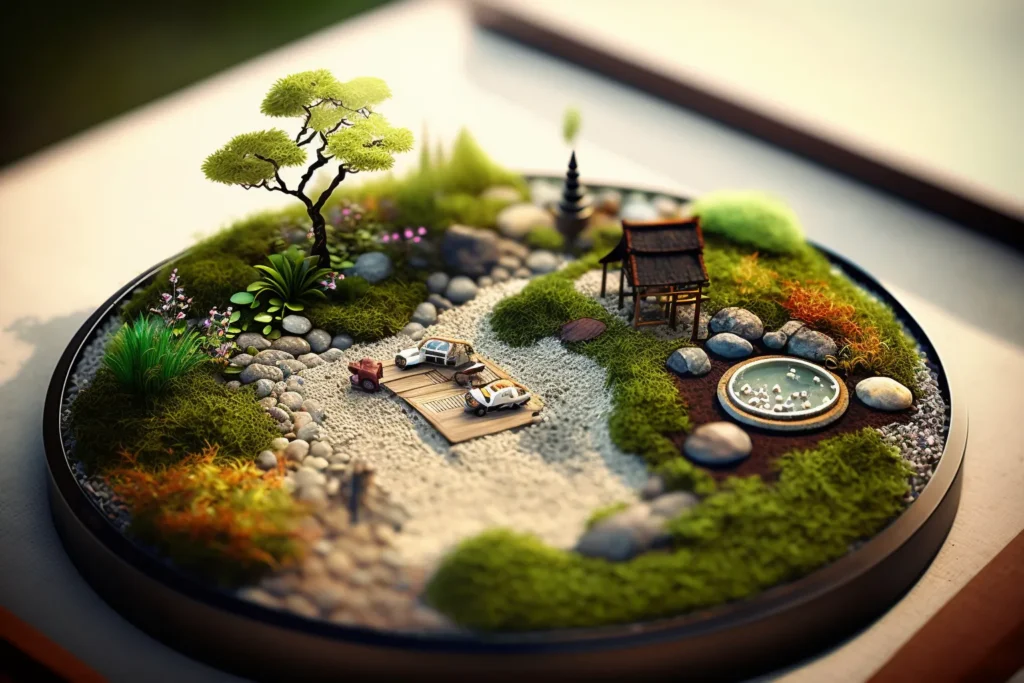
  • How to Create a Miniature Zen Garden for Relaxation

    Unleash your creativity and bring tranquility to your space with this simple, artistic project!

    Step 1: Gather Your Materials
    You’ll need:

    A shallow container (wooden, ceramic, or glass).
    Fine sand (white or colored).
    Small stones, pebbles, or crystals.
    Miniature rake (or make one with toothpicks and glue).
    Optional: small plants, figurines, or shells for decoration.


    Step 2: Prepare the Base

    Fill your container with fine sand to create a flat, even surface.
    Shake the container gently to level the sand or smooth it with your hand.


    Step 3: Arrange the Stones

    Place stones or pebbles in your sand to represent islands or mountains.
    Experiment with groupings to achieve balance and harmony.


    Step 4: Add Decorative Elements (Optional)

    Include small air plants, moss, or figurines like a Buddha or animal to personalize your garden.
    Ensure the design feels calming and uncluttered.


    Step 5: Create Patterns

    Use the miniature rake or a fork to draw patterns in the sand.
    Experiment with swirls, straight lines, or concentric circles around the stones.
    Smooth and redraw as often as you like—it’s part of the Zen process!


    Step 6: Find the Perfect Spot

    Place your Zen garden in a quiet area where you can interact with it.
    Use it to relax, focus, or find inspiration during your day.


    Why It’s Amazing:

    A miniature Zen garden is not only a creative project but also a meditative tool that helps you unwind and spark new ideas. Plus, it’s a beautiful addition to any desk or shelf!

    I hope you like my tutorial.
    Kind regards and have a nice day,

    Andy

    How to Create a Miniature Zen Garden for Relaxation Unleash your creativity and bring tranquility to your space with this simple, artistic project! Step 1: Gather Your Materials You’ll need: A shallow container (wooden, ceramic, or glass). Fine sand (white or colored). Small stones, pebbles, or crystals. Miniature rake (or make one with toothpicks and glue). Optional: small plants, figurines, or shells for decoration. Step 2: Prepare the Base Fill your container with fine sand to create a flat, even surface. Shake the container gently to level the sand or smooth it with your hand. Step 3: Arrange the Stones Place stones or pebbles in your sand to represent islands or mountains. Experiment with groupings to achieve balance and harmony. Step 4: Add Decorative Elements (Optional) Include small air plants, moss, or figurines like a Buddha or animal to personalize your garden. Ensure the design feels calming and uncluttered. Step 5: Create Patterns Use the miniature rake or a fork to draw patterns in the sand. Experiment with swirls, straight lines, or concentric circles around the stones. Smooth and redraw as often as you like—it’s part of the Zen process! Step 6: Find the Perfect Spot Place your Zen garden in a quiet area where you can interact with it. Use it to relax, focus, or find inspiration during your day. Why It’s Amazing: A miniature Zen garden is not only a creative project but also a meditative tool that helps you unwind and spark new ideas. Plus, it’s a beautiful addition to any desk or shelf! I hope you like my tutorial. Kind regards and have a nice day, Andy 😆
    Love
    1
    0 Kommentare 0 Geteilt 4KB Ansichten 0 Bewertungen